January 2026 Release Notes
Q1 2026 / Arthur Terechtchouk
The Superset Release 2 update, scheduled for February 2026, introduces a comprehensive suite of enhancements to the Submittal Management Suite. This release focuses on four key pillars: increasing workflow flexibility, improving project oversight through advanced reporting, providing greater administrative control, and ensuring contractual alignment.
From the highly anticipated ability to move items between packages while preserving historical data to the introduction of customizable status labels and item-level assignments, these updates empower teams to tailor the platform to their specific regional and project-governance needs. Additionally, new "Out-of-the-Box" (OOTB) reports and integrated task due dates provide the transparency required to optimize schedules and balance team responsibilities effectively.
Submittals Suite
Move Items Functionality
The highly anticipated Move Items feature is now live, allowing users to transfer Submittal Items between Packages while fully preserving their status and history. When a Submittal Item is moved:
Data Integrity: All previous revisions, comments, and attachments remain intact.
Automatic Updates: Dependencies and totals are recalculated, and items are automatically re-assigned the next available document number in the destination package.
Workflow Integration: Items seamlessly inherit the workflow elements of the new package.
Access the MOVE ITEMS command is acvalible in the Submittal Package app top banner. Selecting the commend will open the move action panel and display submittal items related to the package. Simply select a destination package for any items not currently under review, then click MOVE ITEMS at the bottom of the panel to complete the process.
To move Submittal Items, select the MOVE ITEMS command from the top banner of the Submittal Package app. This opens the move action panel, displaying all submittal items within that package. Choose a destination package for any items not currently under review, then click MOVE ITEMS at the bottom of the panel to complete the transfer.
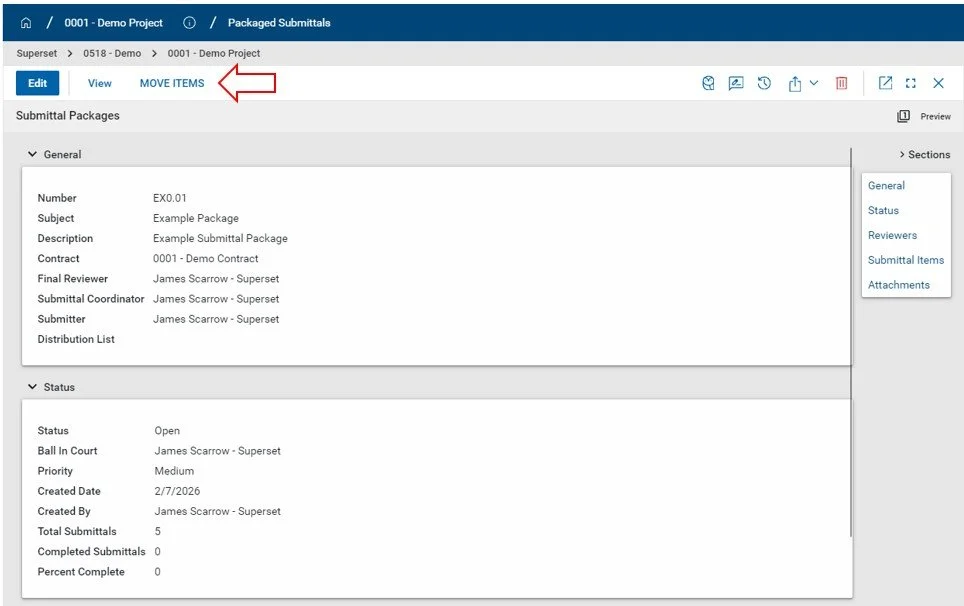
Submittal Package > Move Items command.
Users can select and move any items not currently undergoing review (‘Requested’ status). Simply choose a destination from the TO PACKAGE menu and click MOVE ITEMS at the bottom of the panel to complete the process.
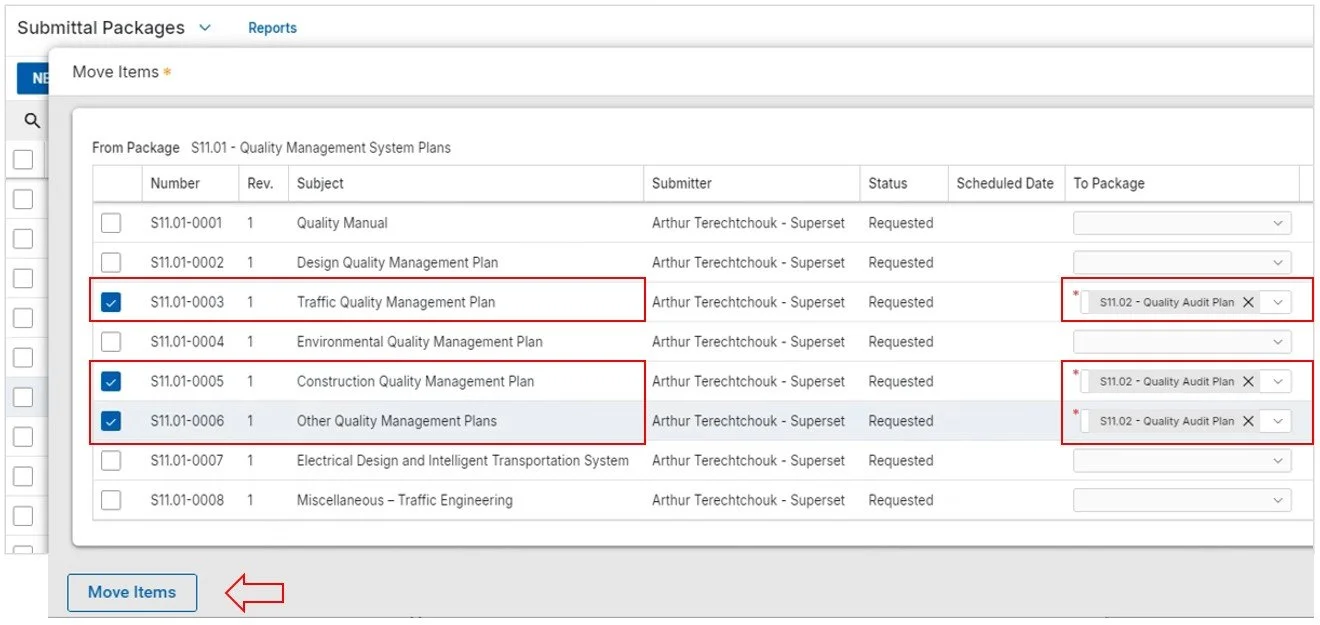
Select the Submittal Items you want to move, then define their destination using the To Package dropdown.
Tracking Moved Items
Moving items between packages is essential for flexibility, but it can create gaps in the Submittal Package registers. To maintain a clear audit trail, the Display Moved Items feature allows you to view transferred items within their original package.
By selecting ‘Show Moved Items’ at the bottom of the Submittal Items section, the system will display a hyperlinked Submittal Item number in the following format: [OLD SI number] > [NEW SI number], so you can quickly navogate to the item's new location.
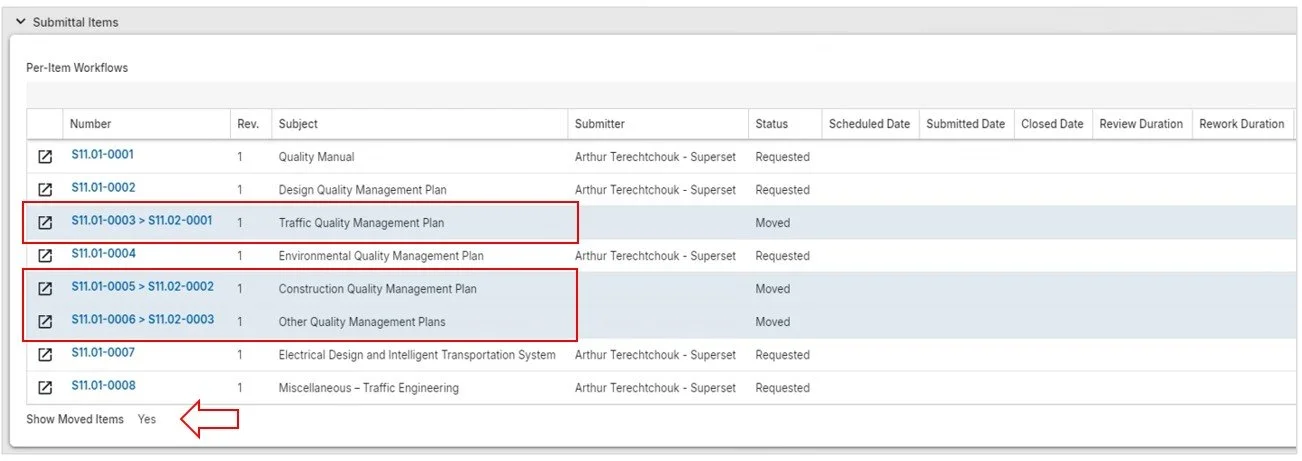
Moved items will be displyed with a unique hyperlinked Submittal Item number identifying past and current number. Additionally status of the moved Submittal is changed to ‘Moved”. Selecting the hyperlink will navigate the user to the active Submittal Item record.
Allow Different Submitters
This feature enables the assignment of a Submitter at the individual Submittal Item level, independent of the parent Submittal Package. This allows for more precise tracking of the specific contacts responsible for each item's submission. Once this setting is enabled, users can modify the Submitter field directly within the Submittal Packages items table, assigning each contact independently.
While submittal items inherit the package-level Submitter by default, enabling this feature allows you to modify the Submitter field directly within the items table for independent assignment.
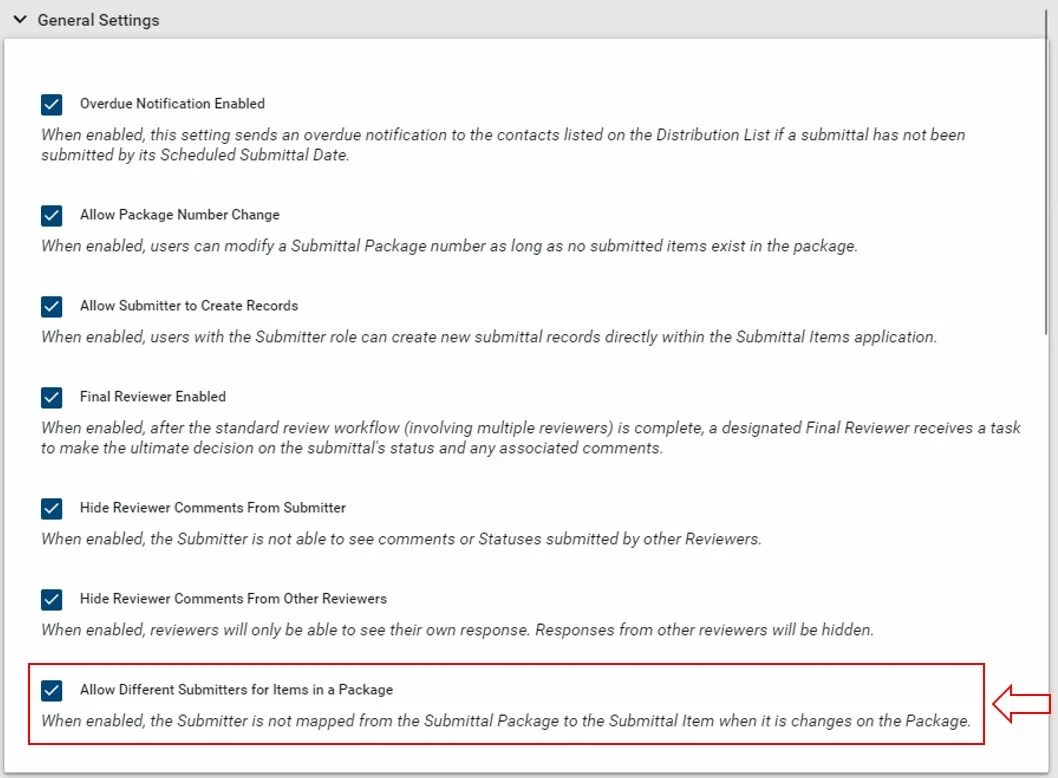
When the setting is enabled. Users will be able to modify the Submitter Field within the items table in Submittal Packages, each Submitter can be assigned independently.
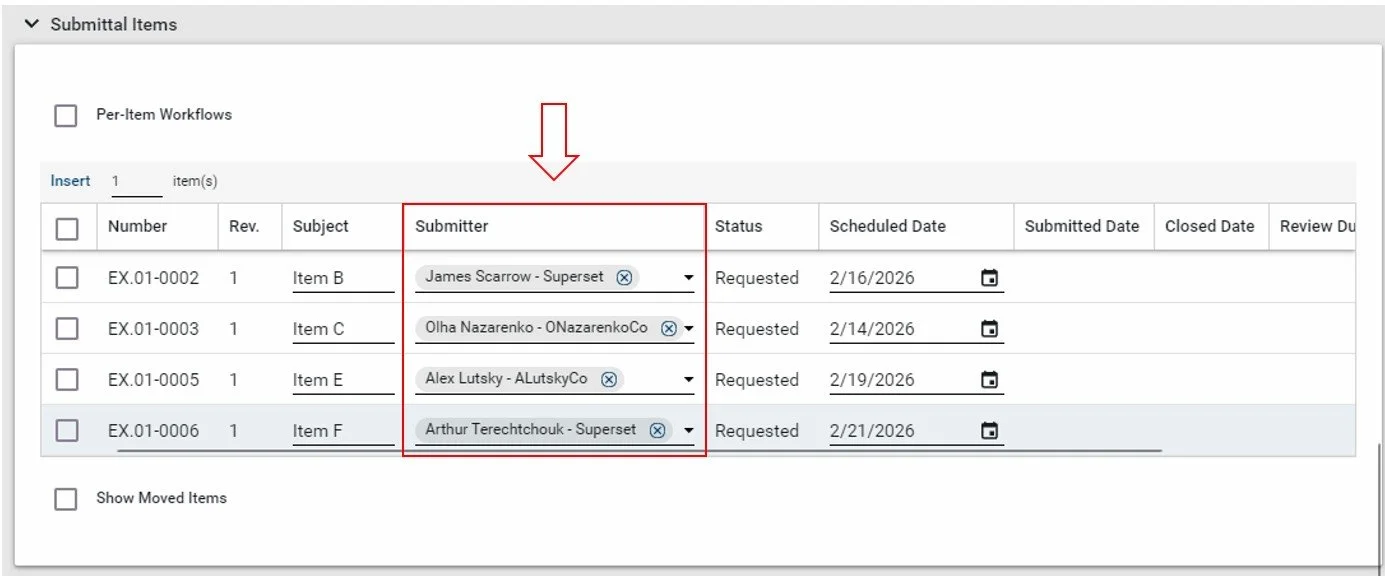
In the Submittal Package > Submittal Items section, users are able to select unique Submitter contacts in the dropdown.
New OOTB Reports
We have expanded our standard reporting library with the following additions:
Six-Month Lookahead: Provides a proactive view of submittal items scheduled for the current month and the half-year ahead. This helps teams balance workloads between submitters and reviewers by refining upcoming submission schedules.
Review Cycle Detail Report: Offers a comprehensive look at submitted items, tracking submission and response dates alongside review and rework durations (in calendar days). Use this to analyze delays and optimize your review process across different revisions.
Upload Log: A dedicated list of all documents uploaded under each Submittal Item for easy auditing.
In-Review Submittal Items: Displays all active submittals grouped by their parent Submittal Package, ensuring the team stays aligned on all "in-flight" items.
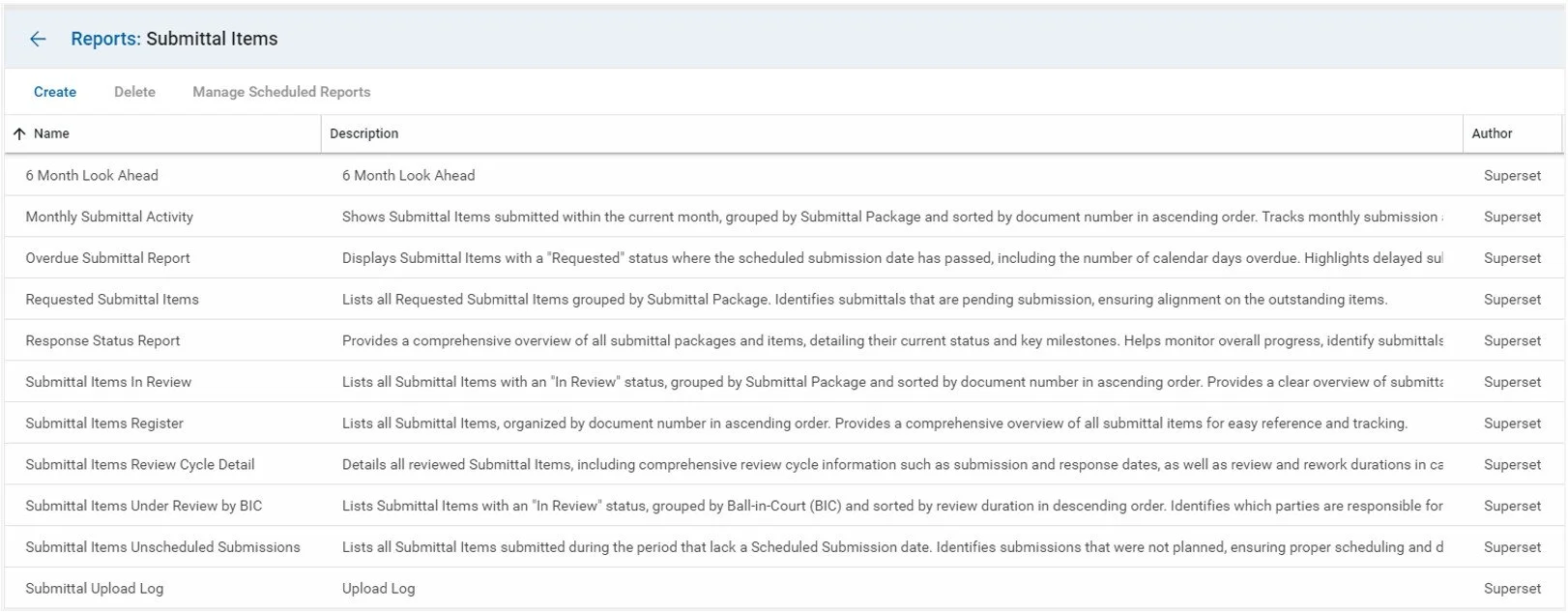
In the Submittal Package > Submittal Items section, users are able to select unique contacts in the submittal dropdown.
Add Due Dates to Tasks
We have updated task creation logic to include Due Dates assigned during the QA Review. These dates are now clearly displayed on all task-related messages.
Timed Workflows: To ensure project momentum, reviewer tasks will automatically close once the due date is reached. The workflow then advances to the next reviewer in the sequence.
Standard Workflows: For all other workflow types, tasks will remain open past the due date. This gives the Submittal Coordinator full discretion to manually recall or manage overdue tasks based on specific project needs.
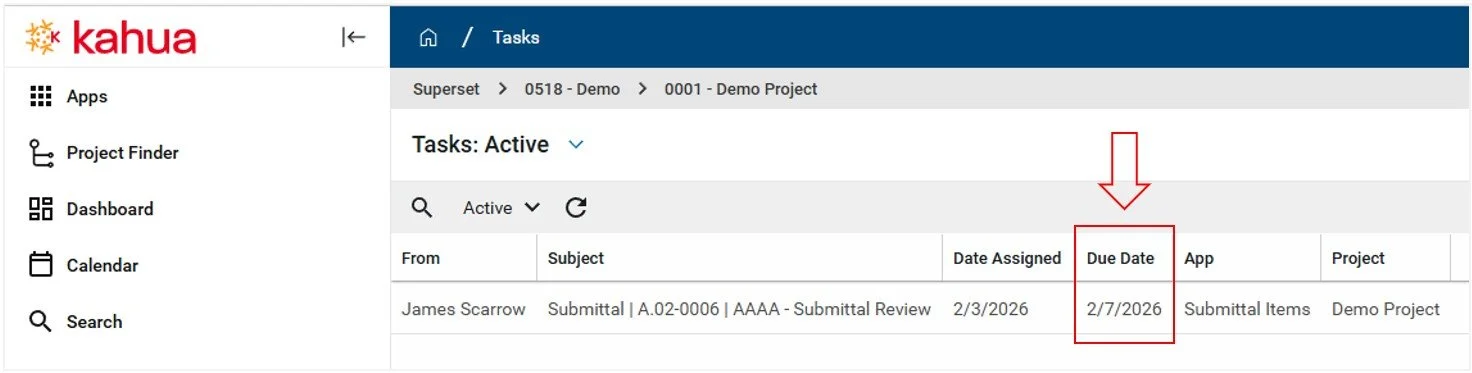
Due Date is mapped to the task based on the assigned workflow type.
Hide Reviewer Comments
New Privacy Controls: Reviewer Comment Visibility
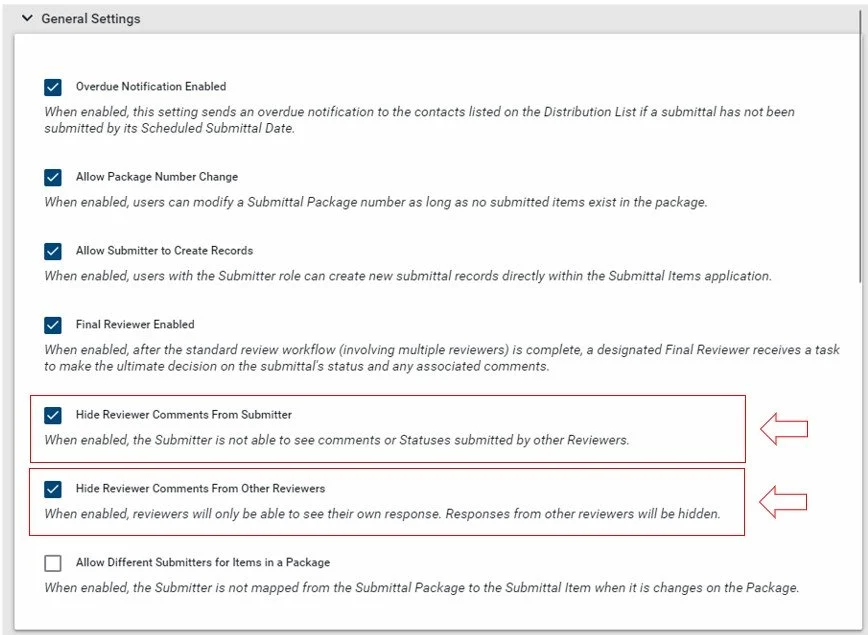
We have introduced two new configuration toggles to give you greater control over who can see internal feedback:
Hide Reviewer Comments from Submitter: Restricts the Submitter’s access to reviewer-specific feedback and attachments. While these details were previously visible by default, this toggle now hides the "Reviewers" section from the Submitter's interface to ensure internal confidentiality.
Hide Reviewer Comments from Other Reviewers: Adds a restriction that prevents reviewers from seeing comments or files submitted by their peers, ensuring an unbiased and independent review process.
Days Past Due Field
We have introduced a Days Past Due field to track delays relative to an item’s scheduled submission date. This attribute calculates the total number of calendar days a Submittal Item is overdue and is available across all log views, forms, and reports. Users can now sort and filter records based on this new attribute for more efficient tracking and oversight.
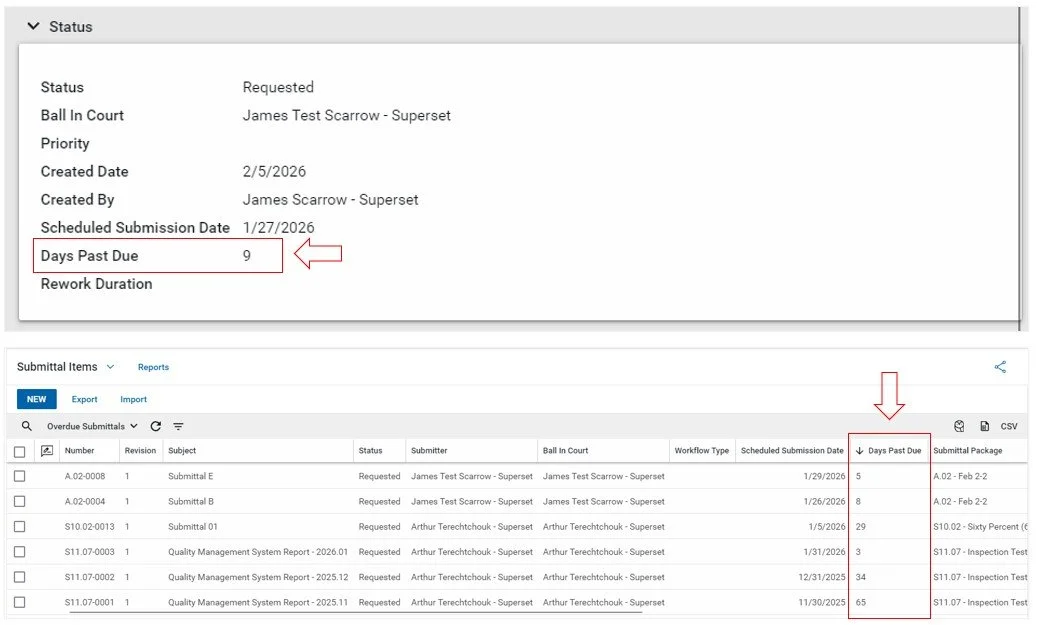
Days Past Due field will be displayed in the Status section of a Submittal item.
Configurable Status Labels
This new functionality allows users to choose from a list of pre-configured status labels or create custom labels to suit their needs. By aligning the system's terminology with specific contract requirements and internal governance, teams can ensure consistent communication across the project.
This update empowers users to choose from pre-configured options or define bespoke status labels tailored to their project. By aligning system terminology with specific contract language and internal governance, teams can ensure seamless, high-clarity communication across the entire project lifecycle.
Contractual Precision: Eliminate the "translation gap" by matching software responses to the exact terminology required by your contract, market sector, or regional standards.
Operational Integrity: Users gain the flexibility to rename statuses without compromising the underlying workflow logic, ensuring that automated actions remain consistent and reliable.
Unified Reviewer Experience: Once configured, these project-specific labels are instantly available to reviewers, ensuring that every response issued is compliant with approved project standard.
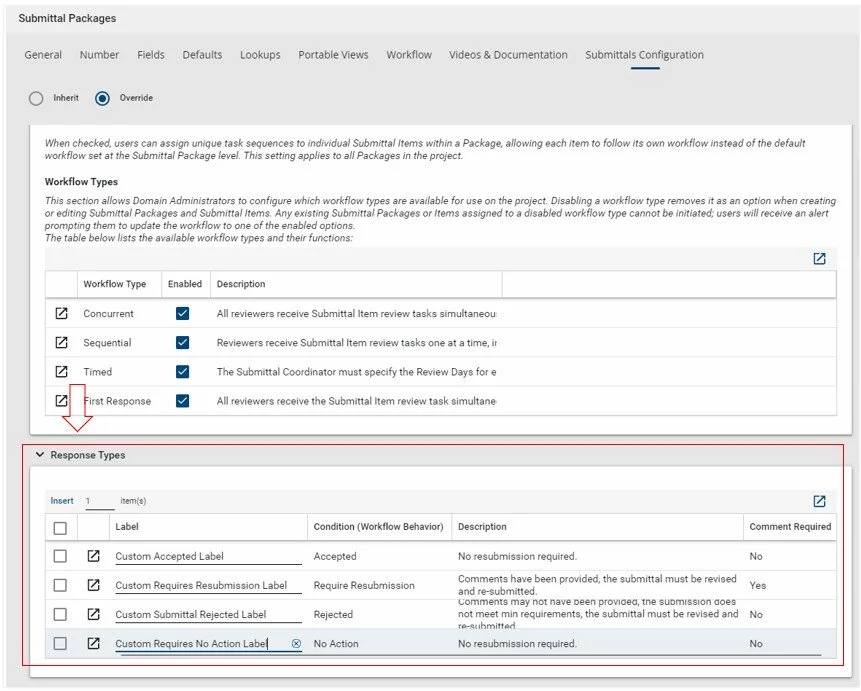
The Response Types panel is now available within the Submittal Package > Configurator > Submittals Configuration tab.